

What features should a good video conference camera have?
Leave a message

In today's digital age, video conferencing has become an integral part of both business and personal communication. As a leading provider of video conference cameras, I've witnessed firsthand the evolution of this technology and understand the key features that make a camera truly exceptional. In this blog, I'll share insights into the essential features that a good video conference camera should possess.
High - Resolution Imaging
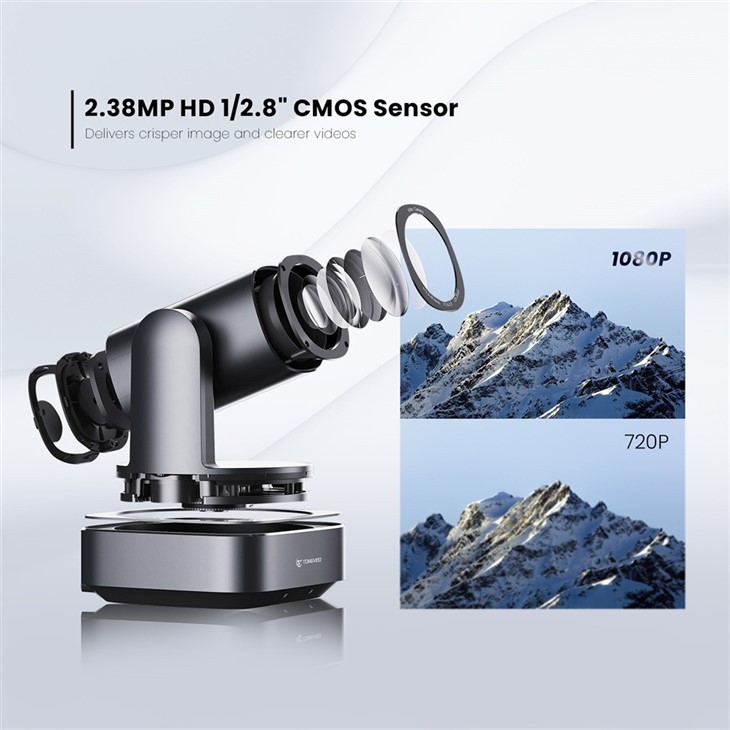
One of the most fundamental features of a quality video conference camera is high - resolution imaging. A camera with a high pixel count can capture sharp, clear, and detailed images. For video conferencing, a minimum of 1080p resolution is recommended. However, 4K resolution cameras are becoming increasingly popular due to their ability to provide an even more immersive and lifelike visual experience.
High - resolution imaging ensures that every participant in the video conference can be seen clearly, regardless of the lighting conditions or the distance from the camera. Whether it's a small team meeting or a large corporate event, clear visuals are crucial for effective communication. Our Ndi Ptz Camera For Church Live Streaming offers excellent high - resolution imaging capabilities, making it suitable for a variety of settings, including live streaming events.
Wide Field of View
A wide field of view (FOV) is another important feature. In a video conference, there may be multiple participants sitting around a table or in a room. A camera with a narrow FOV may not capture everyone in the frame, leading to some participants being left out of the visual communication.
A wide FOV camera can cover a larger area, allowing all participants to be visible. Cameras with a FOV of 120 degrees or more are ideal for conference rooms of various sizes. This feature is especially useful in larger meeting spaces where a single camera needs to cover a wide area. Our NDI Poe Ptz Video Conference Camera is designed with a wide FOV, ensuring that no one is left out of the frame during a video conference.
Pan, Tilt, and Zoom (PTZ) Functionality
PTZ functionality is a game - changer in video conferencing. It allows the camera to pan horizontally, tilt vertically, and zoom in and out. This feature provides flexibility in capturing different angles and focusing on specific areas or individuals during a conference.
For example, if a speaker is moving around the room, the camera can follow their movements with PTZ. Or, if there is a presentation on a whiteboard, the camera can zoom in to provide a clear view. PTZ cameras are also useful for multi - purpose rooms where the setup may change from one meeting to another. Our cameras are equipped with smooth and precise PTZ controls, enabling seamless operation during video conferences.
Low - Light Performance
Not all meeting rooms have ideal lighting conditions. Some may have dim lighting, while others may have uneven lighting. A good video conference camera should perform well in low - light situations.
Cameras with advanced low - light sensors can capture clear and well - lit images even in dimly lit environments. They use technologies such as backlight compensation and noise reduction to enhance the image quality. This ensures that participants are clearly visible, regardless of the lighting in the room. Our cameras are engineered to provide excellent low - light performance, ensuring that your video conferences are clear and professional, no matter the lighting conditions.
Auto - Focus
Auto - focus is a must - have feature for video conference cameras. In a dynamic meeting environment, participants may move around, and objects may be placed in front of the camera. An auto - focus camera can quickly and accurately adjust the focus to keep the subjects sharp and clear.
This feature eliminates the need for manual focus adjustments, which can be time - consuming and disruptive during a video conference. Our cameras are equipped with fast and reliable auto - focus systems that ensure a consistently sharp image, even in a changing environment.
Image Stabilization
Image stabilization is crucial for preventing shaky or blurry images. In a video conference, any movement of the camera, whether it's due to accidental bumps or vibrations, can cause the image to become unstable and difficult to watch.
There are two main types of image stabilization: optical and digital. Optical image stabilization physically adjusts the lens to compensate for movement, while digital image stabilization uses software algorithms to correct the image. Our cameras are equipped with advanced image stabilization technology, ensuring smooth and stable video during the entire conference.
Compatibility
A good video conference camera should be compatible with a wide range of video conferencing platforms and devices. Whether it's Zoom, Microsoft Teams, Google Meet, or other popular platforms, the camera should work seamlessly without any compatibility issues.
It should also be easy to connect to different devices, such as laptops, desktops, and smart TVs. Our Conference Camera For Tv is designed to be highly compatible, allowing you to use it with your existing TV for a more immersive video conferencing experience.
Audio Integration
While the focus is often on the visual aspect, audio is equally important in video conferencing. A good video conference camera should either have built - in high - quality microphones or be able to integrate with external audio systems.

Built - in microphones should be able to pick up voices clearly from a reasonable distance and reduce background noise. This ensures that participants can communicate effectively without any audio disruptions. If the camera supports external audio integration, it provides more flexibility in choosing the audio setup that best suits the conference environment.
Easy Installation and Setup
In today's fast - paced world, time is of the essence. A good video conference camera should be easy to install and set up. It should come with clear instructions and require minimal technical knowledge.
The camera should be able to be mounted easily on a variety of surfaces, such as desks, tripods, or walls. Wireless connectivity options can also simplify the installation process, eliminating the need for messy cables. Our cameras are designed with user - friendly installation in mind, allowing you to start your video conferences quickly.

Security and Privacy
Security and privacy are major concerns in video conferencing. A good video conference camera should have features to protect the privacy of the participants. This may include physical lens covers that can be used to block the camera when not in use.
In addition, the camera should have secure data transmission protocols to prevent unauthorized access to the video feed. Our cameras are designed with robust security features to ensure that your video conferences are private and secure.
Cost - Effectiveness
Finally, cost - effectiveness is an important consideration. A good video conference camera should offer a balance between price and performance. You don't have to break the bank to get a high - quality camera.
Our company offers a range of video conference cameras at different price points, ensuring that there is a suitable option for every budget. Whether you are a small business or a large corporation, we have a camera that can meet your needs without overspending.
In conclusion, a good video conference camera should have a combination of high - resolution imaging, wide field of view, PTZ functionality, low - light performance, auto - focus, image stabilization, compatibility, audio integration, easy installation, security, and cost - effectiveness. At our company, we are committed to providing video conference cameras that meet these high standards.
If you are interested in learning more about our video conference cameras or would like to discuss your specific requirements, we invite you to contact us for a procurement consultation. We look forward to helping you find the perfect camera for your video conferencing needs.
References

- Video Conferencing Industry Reports
- Technical Specifications of Video Conference Cameras





