

Can I use daisy chain microphones for podcasting?
Leave a message

Podcasting has become a dynamic and popular medium for sharing ideas, stories, and knowledge with a global audience. As podcasters strive to elevate the quality of their audio, the choice of microphones plays a pivotal role. One question that often arises in the podcasting community is: "Can I use daisy chain microphones for podcasting?" In this blog post, we'll explore the feasibility, advantages, and considerations of using daisy chain microphones in your podcasting setup, and I'll share insights as a supplier of these innovative audio solutions.
Understanding Daisy Chain Microphones
Daisy chaining refers to a method of connecting multiple devices in a series, where each device is connected to the next in a linear sequence. In the context of microphones, daisy chain microphones allow you to link several microphones together using a single cable or connection point. This setup simplifies the recording process, reduces cable clutter, and enables multiple voices to be captured simultaneously.
Advantages of Using Daisy Chain Microphones for Podcasting
1. Simplified Setup
One of the primary benefits of daisy chain microphones is the ease of setup. Instead of dealing with multiple cables and individual microphone inputs, you can connect multiple microphones in a single daisy chain configuration. This not only saves time but also reduces the complexity of your recording setup, making it ideal for podcasters who are on the go or working in limited spaces.
2. Cost-Effective Solution
Investing in a daisy chain microphone system can be a cost-effective alternative to purchasing multiple standalone microphones and audio interfaces. With a single daisy chain cable, you can connect multiple microphones to a single audio input, eliminating the need for additional equipment. This can result in significant cost savings, especially for podcasters on a budget.
3. Consistent Audio Quality
Daisy chain microphones are designed to provide consistent audio quality across all connected microphones. This ensures that each voice is captured clearly and evenly, without any noticeable differences in volume or tone. Whether you're recording a solo podcast or a panel discussion with multiple guests, daisy chain microphones can help maintain a professional and polished audio output.
4. Flexibility and Scalability
Daisy chain microphone systems offer flexibility and scalability, allowing you to easily add or remove microphones as needed. This makes them suitable for a variety of podcasting scenarios, from small intimate recordings to large group discussions. You can start with a few microphones and expand your setup as your podcast grows, without having to invest in a completely new audio system.
Considerations When Using Daisy Chain Microphones for Podcasting
1. Compatibility
Before purchasing a daisy chain microphone system, it's important to ensure that it is compatible with your existing audio equipment. Check the specifications of your audio interface or mixer to make sure it supports daisy chaining and can handle the number of microphones you plan to connect. Some audio interfaces may require specific drivers or firmware updates to work properly with daisy chain microphones.
2. Cable Length and Signal Loss
The length of the daisy chain cable can affect the quality of the audio signal. Longer cables can introduce signal loss, resulting in a decrease in audio quality. To minimize signal loss, it's recommended to use high-quality cables and keep the cable length as short as possible. Additionally, you may need to use signal boosters or preamps to amplify the audio signal if you're using a long cable.
3. Noise and Interference
When using multiple microphones in a daisy chain configuration, there is a potential for noise and interference. This can be caused by electromagnetic interference (EMI) from nearby electronic devices or ground loops in the audio system. To reduce noise and interference, make sure to use shielded cables and properly ground your audio equipment. You may also need to use noise filters or isolation transformers to further improve the audio quality.
4. Microphone Placement
Proper microphone placement is crucial for achieving optimal audio quality in a podcast. When using daisy chain microphones, it's important to consider the distance between the microphones and the speakers, as well as the angle of the microphones. Make sure the microphones are placed at an appropriate distance from the speakers to avoid audio feedback and ensure that each voice is captured clearly. Additionally, adjust the angle of the microphones to optimize the pickup pattern and minimize background noise.
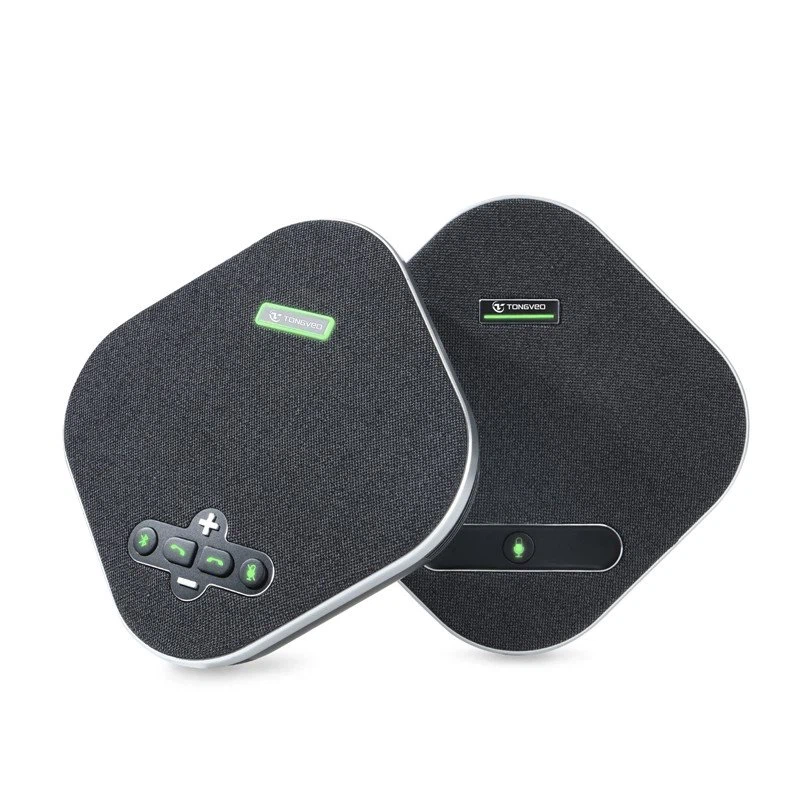
Recommended Daisy Chain Microphones for Podcasting
As a supplier of daisy chain microphones, I recommend the USB Omnidirectional Conference Microphone. This microphone is designed for use in conference rooms, podcasts, and other audio recording applications. It features an omnidirectional pickup pattern, which means it can capture sound from all directions, making it ideal for group discussions and interviews. The microphone can be easily daisy chained with other compatible microphones, allowing you to connect multiple microphones to a single audio input.
How to Set Up Daisy Chain Microphones for Podcasting
- Choose the Right Microphones: Select microphones that are compatible with daisy chaining and suitable for your podcasting needs. Consider factors such as the pickup pattern, sensitivity, and frequency response.
- Connect the Microphones: Use a daisy chain cable to connect the microphones in a series. Make sure to follow the manufacturer's instructions for connecting the cable and ensuring proper polarity.
- Connect the Audio Interface: Connect the daisy chain cable to the audio input of your audio interface or mixer. Make sure to select the appropriate input channel on your audio device.
- Configure the Audio Settings: Open your audio recording software and configure the audio settings to match the input channel of your daisy chain microphones. Adjust the gain, volume, and other settings as needed to achieve the desired audio quality.
- Test the Microphones: Before starting your podcast, test the microphones to ensure that they are working properly. Speak into each microphone and listen for any audio issues such as distortion, noise, or uneven volume.
Conclusion
In conclusion, using daisy chain microphones for podcasting is a viable option that offers several advantages, including simplified setup, cost-effectiveness, consistent audio quality, and flexibility. However, it's important to consider factors such as compatibility, cable length, noise and interference, and microphone placement to ensure optimal audio performance. As a supplier of daisy chain microphones, I'm confident that our products can meet your podcasting needs and help you achieve professional-quality audio.
If you're interested in learning more about our daisy chain microphone solutions or have any questions about using them for your podcast, please don't hesitate to contact us. We're here to assist you with your audio recording needs and help you take your podcast to the next level.
References
- "Podcasting Equipment Guide." Podcast Insights.
- "Daisy Chaining Microphones: A Comprehensive Guide." Audio-Technica.
- "How to Set Up a Podcasting Studio." DIY Audio Expert.





