

Can a 4K UHD Video Bar be used with a tablet?
Leave a message

Hey there! As a supplier of 4K UHD Video Bars, I often get asked if these nifty devices can be used with tablets. Well, let's dive right into this topic and find out.
First off, what exactly is a 4K UHD Video Bar? It's a high - end piece of tech that combines a high - resolution camera, top - notch microphones, and sometimes even speakers into a single, sleek unit. These video bars are designed to deliver crystal - clear video and audio, making them perfect for video conferencing, online teaching, or just chatting with friends and family.
Now, the big question: Can you use a 4K UHD Video Bar with a tablet? The short answer is, in many cases, yes! But there are a few things you need to consider.
Compatibility
The most important factor is compatibility. Tablets come in all shapes and sizes, running different operating systems like iOS and Android. For an Android tablet, it's usually easier to connect a 4K UHD Video Bar. Most Android tablets support USB OTG (On - The - Go) functionality. This means you can use an OTG cable to connect the video bar to your tablet. Once connected, the tablet should recognize the video bar as an external camera and microphone.
On the other hand, iOS tablets, like iPads, are a bit more restrictive. Apple has its own set of rules when it comes to external accessories. You'll need to make sure the 4K UHD Video Bar is MFi (Made for iPhone/iPad) certified. If it is, you can use a Lightning to USB adapter to connect the video bar to your iPad. However, not all video bars have this certification, so you'll have to do your research.
Software and Apps
Even if your tablet can physically connect to the 4K UHD Video Bar, you also need to consider the software and apps you'll be using. For video conferencing apps like Zoom, Google Meet, or Skype, most of them support external cameras and microphones. But you may need to go into the app's settings to select the video bar as your input device.
For example, if you're using Zoom on your Android tablet with a connected 4K UHD Video Bar, open the Zoom app, go to the settings, and under the "Video" and "Audio" sections, select the video bar as your camera and microphone. This way, you'll get the best video and audio quality during your meetings.
Performance
When using a 4K UHD Video Bar with a tablet, you might also notice some performance differences. Tablets have less processing power compared to laptops or desktops. This means that while the video bar can capture high - resolution 4K video, your tablet may struggle to handle it. You might experience some lag or lower frame rates.
To get around this, you can try reducing the video resolution. Most 4K UHD Video Bars allow you to adjust the resolution settings. You can set it to 1080p or even 720p, which will put less strain on your tablet's processor and result in smoother video playback.
Benefits of Using a 4K UHD Video Bar with a Tablet
Despite the potential challenges, there are some great benefits to using a 4K UHD Video Bar with a tablet. First of all, the video quality is way better than the built - in camera on your tablet. The 4K resolution provides sharp, clear images, making you look professional during video calls.
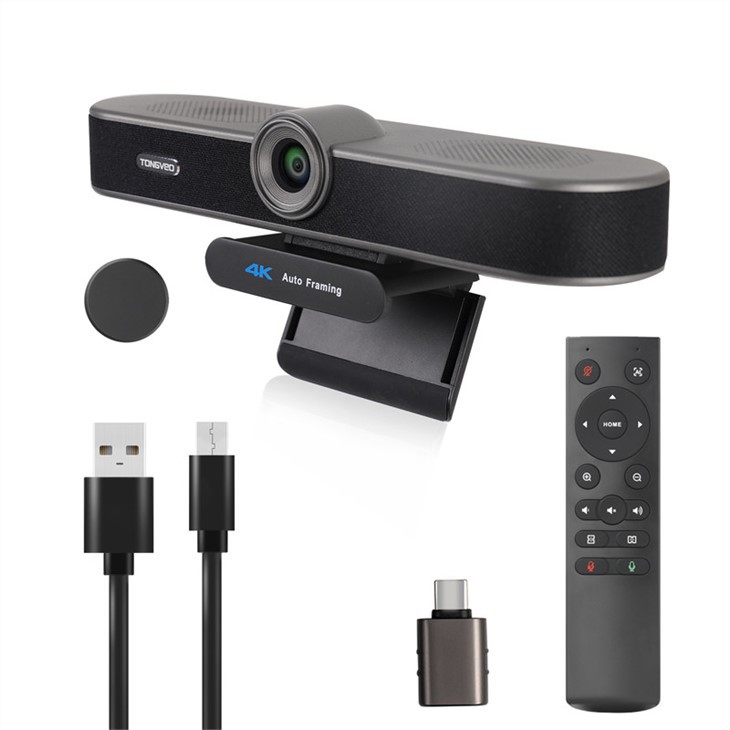

The microphones on a video bar are also much more powerful. They can pick up your voice from a greater distance and reduce background noise. This is especially useful if you're in a noisy environment or if you're having a group call.
Our Product Range
As a 4K UHD Video Bar supplier, we offer a wide range of products that are suitable for different needs. If you're looking for a compact option for small conference rooms or PCs, check out our Compact USB 3 - in - 1 Webcam with Microphone for Small Conference Rooms and PCs. It's a great all - in - one solution that can also be used with tablets.
For those who mainly use Zoom meetings and Google Meet, our Great for Zoom meetings and Google Meet room webcam and microphone is a perfect choice. It's optimized for these popular video conferencing apps and can provide excellent audio and video quality.
And if you have a Mac or need a webcam for conference rooms with a built - in speaker, take a look at our USB 4K HD Webcam with Built - in Speaker for Mac and Conference Rooms. It's a versatile device that can be used with tablets as well.
Conclusion
So, to sum it up, a 4K UHD Video Bar can be used with a tablet, but you need to pay attention to compatibility, software, and performance. With the right setup, you can enjoy high - quality video and audio during your video calls.
If you're interested in purchasing a 4K UHD Video Bar for your tablet or other devices, feel free to reach out to us for more information and to discuss your specific needs. We're here to help you find the perfect solution for your video conferencing requirements.
References
- General knowledge about tablet and video bar compatibility
- Manufacturer's guides for 4K UHD Video Bars
- User experiences and reviews from online forums





